Secure SSH file transfers for Node.js

SCP-style commands with SFTP safety and a typed API.

`scp-next` uploads and downloads files or directories from a CLI, ESM import, or CommonJS require. It uses SFTP internally, keeps local and remote path terminology explicit, and redacts credentials from logs and errors.

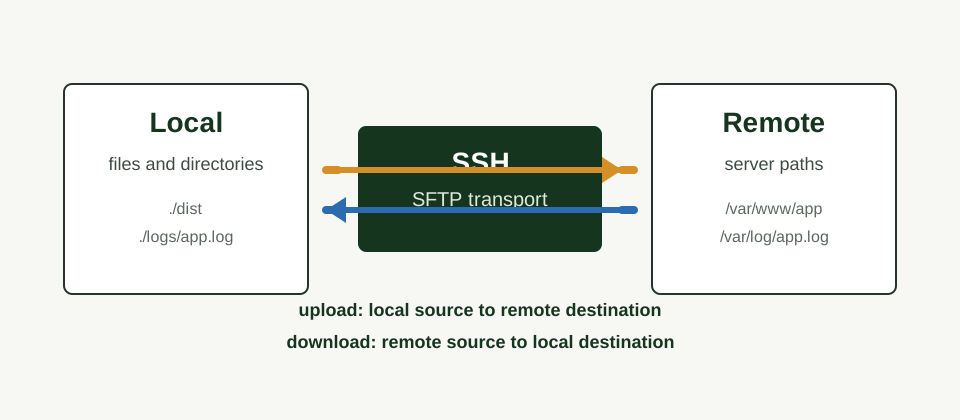
Local and remote transfer flow over SSH SFTP
Upload sends local source paths to remote destinations; download reverses it.

Features

Files and directories

Upload and download files or directories recursively.

Clear CLI operands

Use familiar <source> <destination> order.

ESM and CommonJS

Use the library through ESM import or CommonJS require.

Reusable config

Use JSON configuration files, named profiles, and configured jobs.

Reusable client

Create one client, run multiple transfers, then close it reliably.

Security-conscious

Use SFTP internally and redact credentials from logs and errors.

Install

CLI

npm install --global scp-next
scp-next --help

Library

npm install scp-next

Quick Start

Upload with password authentication

scp-next upload ./dist /var/www/example \
  --host your-host \
  --username your-username \
  --password your-password \
  --recursive

Download with password authentication

scp-next download /var/log/example.log ./logs/example.log \
  --host your-host \
  --username your-username \
  --password your-password
Password arguments are convenient, but they may be exposed through shell history and process listings. Prefer environment variables, SSH agents, or protected private-key files for shared and production machines.

Use the library

import { upload } from "scp-next";

await upload({
  host: process.env.SCP_NEXT_HOST,
  username: process.env.SCP_NEXT_USERNAME,
  password: process.env.SCP_NEXT_PASSWORD,
  localPath: "./dist",
  remotePath: "/var/www/example",
  recursive: true,
  overwrite: true
});

CLI Usage

Commands use the standard operand order: <source> <destination> [options].

Operation Source Destination Command
Upload Local file or directory Remote path scp-next upload <source> <destination> [options]
Download Remote file or directory Local path scp-next download <source> <destination> [options]

Upload with password authentication

scp-next upload ./dist /var/www/example \
  --host your-host \
  --username your-username \
  --password your-password \
  --recursive

Download a log file

scp-next download /var/log/example.log ./logs/example.log \
  --host your-host \
  --username your-username \
  --password your-password

CLI Options

Option Description
--host <host> SSH server host.
--port <port> SSH server port. Defaults to 22.
--username <username> SSH username.
--password <password> SSH password. Prefer environment variables, agents, or keys.
--private-key <privateKey> Private-key content. Redacted from logs and errors.
--private-key-file <privateKeyFile> Private-key file path. Supports ~ expansion.
--passphrase <passphrase> Passphrase for an encrypted private key.
--config <path> Explicit configuration file path.
--profile <name> Named server profile from the configuration file.
--recursive Transfer directories recursively. Defaults to off.
--overwrite Allow replacing existing destination files.
--create-directories Create missing destination directories. Enabled by default.
--no-create-directories Disable automatic destination directory creation.
--dry-run Resolve and validate without connecting or transferring.
--timeout <milliseconds> SSH connection ready timeout in milliseconds.
--verbose Print non-sensitive diagnostic details.
--quiet Disable progress and non-error output.
--help Show command help.
--version Show the package version.

--timeout maps to the SSH readyTimeout. It controls how long to wait for the connection handshake, not the duration of each file transfer or the whole transfer run.

Library API

ESM and CJS

Import from ESM or require from CommonJS using the same public functions.

Explicit paths

Use `localPath` and `remotePath` so callers never infer locality from direction.

Reusable client

Create a client, connect once, perform multiple transfers, and close reliably.

ESM upload

import { upload } from "scp-next";

await upload({
  host: process.env.SCP_NEXT_HOST,
  username: process.env.SCP_NEXT_USERNAME,
  password: process.env.SCP_NEXT_PASSWORD,
  localPath: "./dist",
  remotePath: "/var/www/example",
  recursive: true,
  overwrite: true
});

Reusable client

import { createClient } from "scp-next";

const client = createClient({
  host: process.env.SCP_NEXT_HOST,
  username: process.env.SCP_NEXT_USERNAME,
  password: process.env.SCP_NEXT_PASSWORD
});

try {
  await client.connect();
  await client.upload("./dist", "/var/www/example", {
    recursive: true
  });
} finally {
              await client.close();
}

Use a configuration file

import { readFile } from "node:fs/promises";

import { upload, type ScpNextConfig } from "scp-next";

const config = JSON.parse(
  await readFile(new URL("./scp-next.config.json", import.meta.url), "utf8")
) as ScpNextConfig;

await upload({
  ...config.server,
  ...config.transfer,
  localPath: "./dist",
  remotePath: "/var/www/example"
});

Library Options

Field Used by Description
host server SSH server host.
port server SSH server port. Defaults to 22.
username server SSH username.
password server SSH password. Avoid logging or hard-coding this value.
privateKey server Private-key content as a string or Buffer.
privateKeyFile server Private-key file path.
passphrase server Passphrase for an encrypted private key.
agent server SSH agent socket path.
hostFingerprint server Expected server host-key SHA-256 fingerprint.
knownHostsFile server Known-hosts file for host verification.
localPath upload/download Local source for upload or local destination for download.
remotePath upload/download Remote destination for upload or remote source for download.
recursive transfer Transfer directories recursively. Defaults to false.
overwrite transfer Allow replacing existing files.
createDirectories transfer Create missing destination directories. Defaults to true.
dryRun transfer Validate and plan without modifying local or remote files.
timeout server/transfer SSH connection ready timeout in milliseconds.
onProgress transfer Progress callback for files and directory transfers.

Advanced Usage

`scp-next` supports JSON configuration files, named profiles, reusable jobs, and environment variables. Explicit CLI input always wins.

Config file

{
  "server": {
    "host": "your-host",
    "port": 22,
    "username": "your-username",
    "password": "your-password"
  },
  "transfer": {
    "recursive": true,
    "overwrite": true,
    "createDirectories": true,
    "timeout": 30000
  }
}

Configured job

{
  "jobs": {
    "deploy": {
      "operation": "upload",
      "profile": "production",
      "source": "./dist",
      "destination": "/var/www/example",
      "recursive": true
    }
  }
}

Explicit config path

scp-next upload ./dist /var/www/example \
  --config ./deploy/scp-next.json

Config profile

scp-next upload ./dist /var/www/example \
  --config ./scp-next.config.json \
  --profile production

Configuration File Options

Use scp-next.config.json in the current directory. scp-next also auto-detects rc-style filenames: .scp-nextrc and .scp-nextrc.json.

Key Description
server SSH connection options such as host, port, username, and keys.
transfer Transfer defaults such as recursive, overwrite, and timeout.
defaultProfile Profile used when no CLI or environment profile is selected.
profiles Named server connection profiles.
jobs Reusable upload or download jobs for scp-next run.
root server keys Simple configs may place server keys such as host, username, and privateKeyFile at the root.

Server Fields

Field Description
host SSH server host.
port SSH server port. Defaults to 22.
username SSH username.
password SSH password. Prefer environment variables or protected secrets.
privateKey Private-key content.
privateKeyFile Private-key file path.
passphrase Passphrase for an encrypted private key.
agent SSH agent socket path.
timeout SSH connection ready timeout in milliseconds.
hostFingerprint Expected server host-key SHA-256 fingerprint.
knownHostsFile Known-hosts file for host verification.

Transfer and Job Fields

Field Used by Description
operation jobs upload or download.
profile jobs Named server profile for the job.
source jobs Origin path. Local for upload, remote for download.
destination jobs Destination path. Remote for upload, local for download.
recursive transfer/jobs Transfer directories recursively. Defaults to false.
overwrite transfer/jobs Allow replacing existing files.
createDirectories transfer/jobs Create missing destination directories. Defaults to true.
dryRun transfer/jobs Resolve and validate without connecting or transferring.
timeout transfer/jobs SSH connection ready timeout in milliseconds.

Environment Variables

Variable Description
SCP_NEXT_HOST SSH server host.
SCP_NEXT_PORT SSH server port.
SCP_NEXT_USERNAME SSH username.
SCP_NEXT_PASSWORD SSH password.
SCP_NEXT_PRIVATE_KEY Private-key content.
SCP_NEXT_PRIVATE_KEY_FILE Private-key file path.
SCP_NEXT_PASSPHRASE Passphrase for an encrypted private key.
SCP_NEXT_TIMEOUT SSH connection ready timeout in milliseconds.
SCP_NEXT_PROFILE Named configuration profile.
SSH_AUTH_SOCK SSH agent socket used when agent authentication is available.

Precedence

  1. Explicit CLI options
  2. Positional CLI operands
  3. Environment variables
  4. Selected configuration profile
  5. Root-level configuration values
  6. Configured job values
  7. Internal defaults

User Guides

Read the versioned user guides for a fuller introduction to installation, CLI transfers, configuration files, credential handling, library usage, and onboarding.

Security

  • Transfers use SFTP through `ssh2-sftp-client`; normal transfers do not run remote shell commands.
  • Passwords, passphrases, private-key contents, and tokens are redacted from logs and errors.
  • Host verification is not silently disabled. Configure known hosts or a host fingerprint when required.
  • Local paths use OS-aware Node path behavior; remote paths preserve POSIX `/` separators.
  • Dry-run mode resolves and validates a transfer plan without connecting or modifying files.

Architecture

CLI layer

Parses operands and options, prints readable output, and maps failures to exit codes.

Client layer

Exposes upload, download, copy, and reusable client APIs without calling `process.exit()`.

Transport boundary

Keeps SFTP access mockable, which lets integration tests run without a production server.

For deeper implementation notes, read docs/ARCHITECTURE.md.